


Gone are the days when a laptop was just an optional gadget. With technological advancements and remote work becoming more common, laptops have become a necessity for professional use. However, with this increased usage comes the risk of data breaches and theft, making it crucial to have proper laptop tracking solutions in place to monitor their lifecycle and maintenance effectively.
It all can be done using an IT asset management software, which allows you to track various details of your laptops, such as serial numbers, purchase dates, locations, current users, and conditions. With this information, organizations can have better control over their laptop inventory and ensure proper maintenance throughout its lifecycle.
Therefore, this article will discuss how organizations can track laptop lifecycles and manage maintenance effectively. It will also explore key concepts like lifecycle management, proactive strategies, and practical steps that can help organizations improve IT asset handling and optimize their processes.
So, let’s get started!
Understanding Laptop Lifecycle Management
Laptop lifecycle management involves overseeing every phase of a device’s lifespan, from acquisition to its eventual decommissioning. Therefore, it’s an essential practice for businesses to maintain productivity and reduce expenses related to their hardware downtime or premature replacements.
Key Stages in a Laptop’s Lifecycle
Below are the key stages of a laptop’s lifecycle that organizations need to handle effectively:
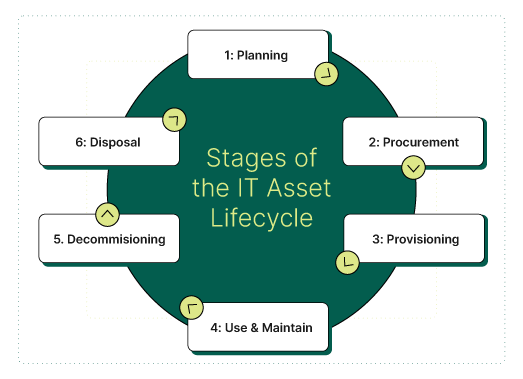
- Planning: This stage involves identifying laptop requirements, budgeting, and considering factors like warranty and maintenance costs. It’s essential to have a clear understanding of your organization’s long-term goals and tech needs during this stage.
- Procurement: Once planning is complete, organizations acquire laptops from vendors or lease them depending on their budget and needs.
- Provisioning: After procurement, laptops are configured with the necessary software and data before being assigned to users. During this stage, you must track each device’s serial number, configuration details, and user information for efficient management in the future.
- Usage and Maintenance: In this stage, laptops are actively used by employees for their daily tasks. Organizations must have a proactive approach towards maintenance, including regular updates, security patches, and performance monitoring.
- Decommissioning: At the end of its lifecycle, the laptop is decommissioned or replaced. This involves data wiping, retirement from inventory records, and proper disposal methods. This stage also requires proper documentation for financial and security purposes.
- Disposal or Recycling: The final stage involves responsibly disposing of or recycling the laptop. It’s important to choose environmentally friendly disposal methods.
The Need for Laptop Tracking Software
Although there are various ways to manage devices manually. However, manual tracking of laptops presents several challenges that affect efficiency and security. It can lead to the following:
- Time-consuming processes are prone to human error.
- Inaccurate inventory records that hinder effective planning and budgeting.
- Difficulty in tracking laptops that are lost or stolen.
- Inadequate control over sensitive data contained on the laptop.
On the other hand, automated laptop tracking software acts as an extra layer of protection and management. It gives businesses real-time visibility into their hardware assets. Moreover, allows them to track location data, monitor IP addresses, and even use technologies like Wi-Fi triangulation to pinpoint a device’s whereabouts. All of this helps businesses stay proactive rather than reactive when managing valuable IT assets.
Key Features of Effective Laptop Tracking Software
Robust laptop tracking solutions have various features designed to help organizations efficiently manage their devices. Some of the key features include:
Real-Time Location Tracking
One of the most critical functionalities of tracking software is the ability to monitor where a device is at any given time. Using geolocation tools such as Wi-Fi triangulation, businesses can efficiently track down lost or stolen laptops. This minimizes downtime and reduces the risk of data breaches.
User Assignment and History
A comprehensive history of user assignments gives businesses insight into who has used a device and for what purpose. This level of detail improves accountability and simplifies troubleshooting when performance issues occur. Additionally, having access to a laptop’s usage history further aids in informed decision-making regarding repairs, upgrades, or replacements.
Software License Management
Managing software licenses connected to each device ensures compliance with licensing agreements. This feature minimizes unnecessary spending and mitigates the risks of potential legal penalties. Furthermore, it facilitates smooth license transfers during device redeployment or retirement, ensuring operational consistency.
Integration Capabilities
Integration with existing systems also enhances the efficiency of laptop tracking solutions. For instance, syncing with employee databases streamlines processes during onboarding or offboarding. These integrations reduce manual work and maximize productivity, ensuring seamless operations across departments.
To enhance security, some systems like Teqtivity allow businesses to incorporate TeQube Modular smart lockers to modernize their IT operations. These lockers are designed to store everything from smartphones and laptops to larger items like backpacks, which provides a seamless and efficient storage solution for your company’s inventory.
Teqtivity’s Approach to Laptop Tracking
Teqtivity makes IT asset management simple and efficient, helping businesses streamline their laptop tracking processes, which are designed for easy access and usability.
Moreover, Teqtivity’s IT asset management platform empowers businesses to track every detail of a laptop’s lifecycle, from procurement to disposal. It features many powerful tools like real-time monitoring, predictive maintenance notifications, and multi-system integrations that give businesses a single source of truth for better decision-making.
Teqtivity also strengthens operational efficiency through integrations with many platforms like Jamf Pro, Jira, Zendesk, G-Suite, Slack, Okta, and HR systems. These integrations simplify processes like onboarding and offboarding by reducing human errors and ensuring seamless device management. This is particularly beneficial for organizations managing a large number of devices, where operational precision is essential.
So, if you’re looking for an efficient and secure way to track your laptops, Teqtivity is the best option. Click here to request a demo!
Best Practices To Implement Laptop Tracking
Once you select and implement the right laptop tracking software, it’s essential to establish best practices for using the system effectively. These practices can help you maximize the benefits of laptop tracking and ensure a smooth workflow.
You can achieve this by following these steps:
- Integrate a Centralized Platform
A centralized platform like Teqtivity can help you streamline your laptop tracking process. With features such as automated asset creation when integrated with MDM solutions like Jamf, Kandji, Intune, comprehensive inventory management, customizable reporting, and real-time asset visibility, you can improve efficiency and gain better control over your IT assets
- Train Your Workforce
It’s also essential to train your employees on the tracking protocols to ensure compliance. This includes reporting lost devices immediately and logging maintenance issues in real time.
- Establish Clear Institutional Policies
Clearly defined policies for device usage, security measures (like mandatory encryption), and maintenance schedules are crucial for effective laptop tracking. These policies should be communicated and enforced across the organization.
- Regular Audits and Updates
Regular audits and system updates are essential to ensure the system is functioning correctly and there are no policy deviations. Utilizing analytics tools like Teqtivity for IT auditing can help identify gaps and implement new features seamlessly.
By following these best practices, your organization can ensure efficient laptop tracking, reduce the risk of data breaches, and improve overall accountability and productivity.
Maintenance Tracking and Optimization
Maintenance tracking and optimization are crucial components of an efficient laptop tracking system, as proactive upkeep helps prevent breakdowns that disrupt workflows.
Teqtivity enhances IT asset management by offering a centralized platform for tracking and managing assets throughout their lifecycle. It offers real-time asset visibility and customizable reporting features that support maintenance efforts. By centralizing asset data, Teqtivity enables organizations to:
- Track asset histories from acquisition to disposal
- Generate custom reports for easier audits and analysis
- Set up automated workflows for asset management tasks
This structured approach allows IT teams to identify patterns, plan upgrades, and make informed decisions about their assets, potentially extending laptop lifespans and minimizing disruptions. It ultimately reduces disruptions and optimizes laptop performance.
Security and Compliance
The security and compliance of laptops are critical concerns for businesses, especially with the rise in data breaches. However, IT Asset Management (ITAM) solutions like Teqtivity offer features that help businesses mitigate these risks.
These solutions provide real-time monitoring of IT assets throughout their lifecycle and can integrate with Mobile Device Management (MDM) systems for enhanced security.
In addition, ITAM solutions aid in keeping accurate records of device location and usage for regulatory audits and ensuring secure disposal practices that align with industry standards. Because they offer enhanced reporting and compliance tools to meet modern regulations. This helps businesses maintain their compliance posture.
Overall, the combination of asset management and security solutions helps create a balance between data protection and operational needs, ultimately safeguarding businesses from potential data breaches.
Cost Savings and ROI
ROI is the prime focus when businesses adopt any solution. Laptop tracking software like Teqtivity can provide both direct and indirect cost savings for organizations. With robust tracking features, businesses can reduce asset loss while optimizing device utilization to increase ROI.
These tools offer valuable insights into asset usage patterns, helping organizations improve budgeting strategies and make smarter procurement decisions.
By accurately forecasting replacement schedules, businesses can allocate budgets effectively and reduce financial strain, leading to higher ROI overall.
Key Takeaways
Ready to optimize your IT asset tracking with Teqtivity’s innovative solutions designed for smarter management? Book your free demo and see how it works!